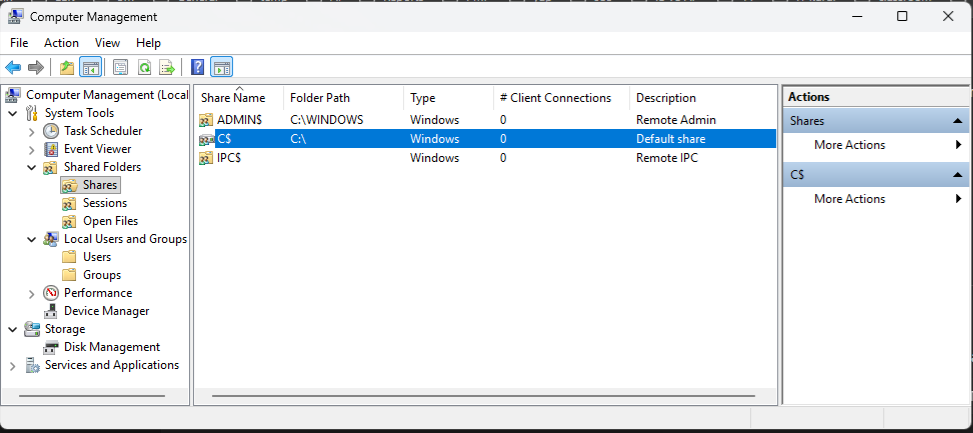
Registry ile kalıcı kapatma (en doğru yöntem) regedit açın Şu path’e gidin:HKEY_LOCAL_MACHINE\SYSTEM\CurrentControlSet\Services\LanmanServer\Parameters Sağ tarafta yeni bir DWORD oluşturun:AutoShareWksDeğer:0Server işletim sistemi ise isim farklı olur:AutoShareServer Ardından servisi restart edin veya bilgisayarı yeniden başlatın: net stop lanmanservernet start lanmanserver veya reboot.
To permanently disable c$ sharing on your computer:
Permanently shutting down the server via the Registry (the most accurate method) Open regedit Go to this path:HKEY_LOCAL_MACHINE\SYSTEM\CurrentControlSet\Services\LanmanServer\Parameters Create a new DWORD on the right side:AutoShareWksValue:0If the server is an operating system, the name will be different:AutoShareServer Then restart the service or reboot the computer: net stop lanmanservernet start lanmanserver...
Microsoft Office 365 SMTP settings

SMTP server name smtp-mail.outlook.comSMTP port 587SMTP encryption STARTTLSAuthentication Method OAuth2/Modern Auth IMAP sunucusu outlook.office365.comIMAP bağlantı noktası 993IMAP şifrelemesi SSL/TLSKimlik Doğrulama Yöntemi OAuth2/Modern Kimlik Doğrulaması POP sunucusu adı outlook.office365.comPOP bağlantı noktası 995POP şifrelemesi SSL/TLSKimlik Doğrulama Yöntemi OAuth2/Modern Kimlik DoğrulamasıSMTP sunucusu adı smtp-mail.outlook.comSMTP bağlantı noktası 587SMTP şifrelemesi STARTTLSKimlik Doğrulama Yöntemi OAuth2/Modern Kimlik...

